MAKE YOUR OWN BUNDLE - BUY ANY 3 SVGS - GET 30% OFF

Laura Shirley | 15 hours ago

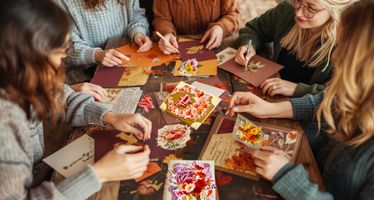
How to Organize a Card-Making Group for Charity

Gather your crafting friends and spread joy! Learn how to organize a charity card-making group with easy guidelines to send handmade paper cards to kids and seniors.

Define Your Mission and Audience

The first step in organizing a group is setting a clear focus. Your mission will determine your card themes and guidelines.


For Kids (Uplifting):

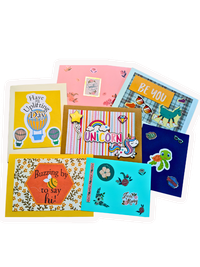
Focus on vibrant, inspiring, and handmade cards to "uplift spirits," as emphasized by Cardz for Kidz. Themes should be highly positive and encouraging.


For Seniors (Connection):

Focus on messages that foster connection and remind recipients they are valued. Bring Smiles to Seniors highlights the importance of addressing loneliness and isolation.

Establish Card Guidelines: The "Do's and Don'ts"

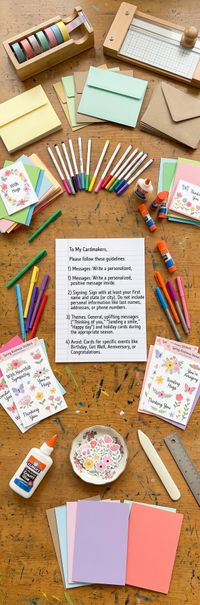
Charity organizations have specific rules to ensure cards are appropriate for all recipients. Communicate these guidelines clearly to your group:


Messages

Write a personalized, positive message inside.

Makes the card feel genuinely handmade and thoughtful.

READ ARTICLE ON KINDNESS MESSAGES


Signing

Sign with at least your first name and state (or city).

Do not include personal information like last names, addresses, or phone numbers.

Maintains privacy and safety for both the sender and the recipient.


Themes to Focus On

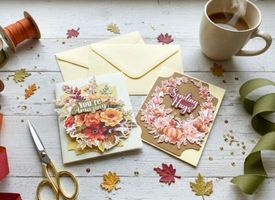
General, uplifting messages ("Thinking of you," "Sending a smile," "Happy day") and holiday cards during the appropriate season.

These are versatile and can be distributed widely without needing specific recipient data.


Themes to Avoid

Cards for specific events like

Birthday, Get Well, Anniversary, or Congratulations

unless specifically requested by the charity.

Charities often lack the personal information needed to properly distribute these specific occasion cards.

Get the Cards Ready to Send

Getting the cards ready for donation is just as important as the making process.


No Glitter (Generally):

While not explicitly stated by both, many charities that serve hospitals (like Cardz for Kidz recipients) and facilities ask you to avoid excess glitter or certain adhesives, as they can cause issues in sterile environments or for recipients with sensitivities.


Do Not Seal the Envelopes:

Nearly all card charities, including Bring Smiles to Seniors, require that cards be sent

unsealed. The distribution team must review the cards for content before they are delivered. Simply tuck the card under the envelope flap.


Collect and Review:

Appoint a "Card Reviewer" in your group to quickly check that all cards meet the charity's guidelines (no personal info, appropriate themes) before packaging them up to mail.


By following these best practices, your card-making group can efficiently create heartfelt, appropriate, and high-impact cards that truly bring smiles to seniors and kids alike.
Let’s create what matters — together.

Laura Shirley

More Posts

<p>World Kindness Day: Spreading Joy, One Craft at a Time!</p><p>World Kindness Day: Spreading Joy, One Craft at a Time!</p>

World Kindness Day: Spreading Joy, One Craft at a Time!

Hey there, kindness champions! Have you ever noticed how a tiny act of kindness can completely turn your day around? Maybe it was a genuine smile from a stranger, a friend offering a helping hand, or even just a sweet note. Those moments are pure magic, right? And guess what? There’s a whole day dedicated to celebrating that magic: World Kindness Day!

A Fiesta of Memories: Crafting the Vibrant Spirit of Día de MuertosA Fiesta of Memories: Crafting the Vibrant Spirit of Día de Muertos
A Fiesta of Memories: Crafting the Vibrant Spirit of Día de Muertos

If there is one thing I love most about paper crafting, it is the magic of taking a few simple sheets of cardstock and turning them into something bursting with heart, memory, and love.

Growing up in California, I was lucky enough to be surrounded by colorful cultural celebrations, but Día de Muertos (Day of the Dead) has always held a truly special place in my heart. The moment November arrives, homes and streets fill with glowing candles, brilliant golden marigolds, playful sugar skulls, and music. It is anything but spooky—it is a joyful, warmth-filled family reunion where we honor and celebrate the sweet memories of loved ones who hold a permanent place in our hearts.

If you’ve been looking for a meaningful way to bring this colorful, family-focused celebration into your home, you are in the right place! With your Cricut or Silhouette machine, you can turn colorful paper into radiant home decor, and glowing keepsakes to celebrate family for this festive time of year.

How to Download & Unzip Your SVG Files: A Friendly Step-by-Step GuideHow to Download & Unzip Your SVG Files: A Friendly Step-by-Step Guide
How to Download & Unzip Your SVG Files: A Friendly Step-by-Step Guide
Learn how to easily download and unzip SVG cut files for your Cricut or Silhouette machine with this simple, step-by-step guide.
The Ultimate 3D Paper Crafting Glossary: Your Friendly Guide to Cricut  Silhouette TermsThe Ultimate 3D Paper Crafting Glossary: Your Friendly Guide to Cricut  Silhouette Terms
The Ultimate 3D Paper Crafting Glossary: Your Friendly Guide to Cricut Silhouette Terms

Hello there, creative friend! 💖

If you’ve ever looked at a gorgeous, intricate 3D paper project and thought, "That looks absolutely magical, but what on earth do all these terms mean?"—please know you are not alone! When I first bought my electronic cutting machine, I felt completely overwhelmed by letters like "SVG," words like "basis weight," and software buttons I didn't understand. I made every "rookie" mistake in the book so you don’t have to!

My mission at Bella Carta Design is to make 3D paper crafting joyful, accessible, and completely frustration-free. Think of this glossary as your cozy, trusted crafting companion. Grab a warm cup of tea, and let's demystify these terms together so you can start creating cute crafts with paper and heartfelt hand craft gifts today!

Instructions for Downloading Zip Files
<p>Why Handmade Cards Matter More Than Ever</p><p>Why Handmade Cards Matter More Than Ever</p>

Why Handmade Cards Matter More Than Ever

In a world overflowing with digital notifications, emojis, and text pings, something as simple as a handmade card can feel like a rare treasure. It’s tangible, thoughtful, and deeply human. And right now, in this season of Gratitude and Giving, handmade cards matter more than ever. 

<p>Your Craft Can Do So Much Good</p><p>Your Craft Can Do So Much Good</p>

Your Craft Can Do So Much Good

Grab your favorite mug, settle in, and let's talk about something wonderful: using our paper-crafting passion to genuinely make the world a better place. If you've ever felt that little pull to do more with your gorgeous card stash, you're in the perfect spot! This is your go-to resource for turning your crafting table into a kindness assembly line. You'll find easy how-to guides, inspirational stories, and all the verified organizations—like Cardz for Kidz and Bring Smiles to Seniors—that are just waiting for your beautiful handmade cards. Let's start spreading some real, tangible joy together!

<p>How To Avoid the RED MAT in Cricut</p><p>How To Avoid the RED MAT in Cricut</p>

How To Avoid the RED MAT in Cricut

Step by step instructions on setting score lines


If you’ve ever uploaded an SVG file and hit "Make It" in Cricut Design Space only to see that dreaded red mat with all the scattered lines, you aren’t alone! It’s one of the most common hiccups when working with SVG files in Cricut Design Space.

Usually, this happens because the software thinks your score lines are meant to be cut lines, or it doesn't realize those lines are supposed to stay stuck to your project. Don't sweat it—here is a quick, friendly guide to getting those files fixed and your project back on track.


<p>Let’s Get Crafty! 7 Cutting Machine Tips I Wish I Knew Before I Started</p><p>Let’s Get Crafty! 7 Cutting Machine Tips I Wish I Knew Before I Started</p>

Let’s Get Crafty! 7 Cutting Machine Tips I Wish I Knew Before I Started

Hey there, friend! Laura Shirley here, and I am so glad you stopped by. Opening up a brand-new cutting machine is such a thrilling moment, but if I’m being completely honest, it can feel a little intimidating, too. When I first brought home my Silhouette Cameo 4, I had grand visions of instantly creating beautiful hand craft gifts, interactive pop-up cards, and charming home decor.


Spoiler alert: my early attempts mostly turned expensive cardstock into colorful confetti!

Whether you're opening up your machine for the very first time, searching for fresh cricut inspiration, or planning cute crafts with paper to fill your weekend, I’ve made all the "rookie" mistakes so you don’t have to. From setting up your mat in cricut space to finding the best svg files for cricut, silhouette, or laser tools, these seven tips will take you from "What on earth does this button do?" to crafting with total confidence. Grab a warm cup of coffee or tea, and let’s jump in!